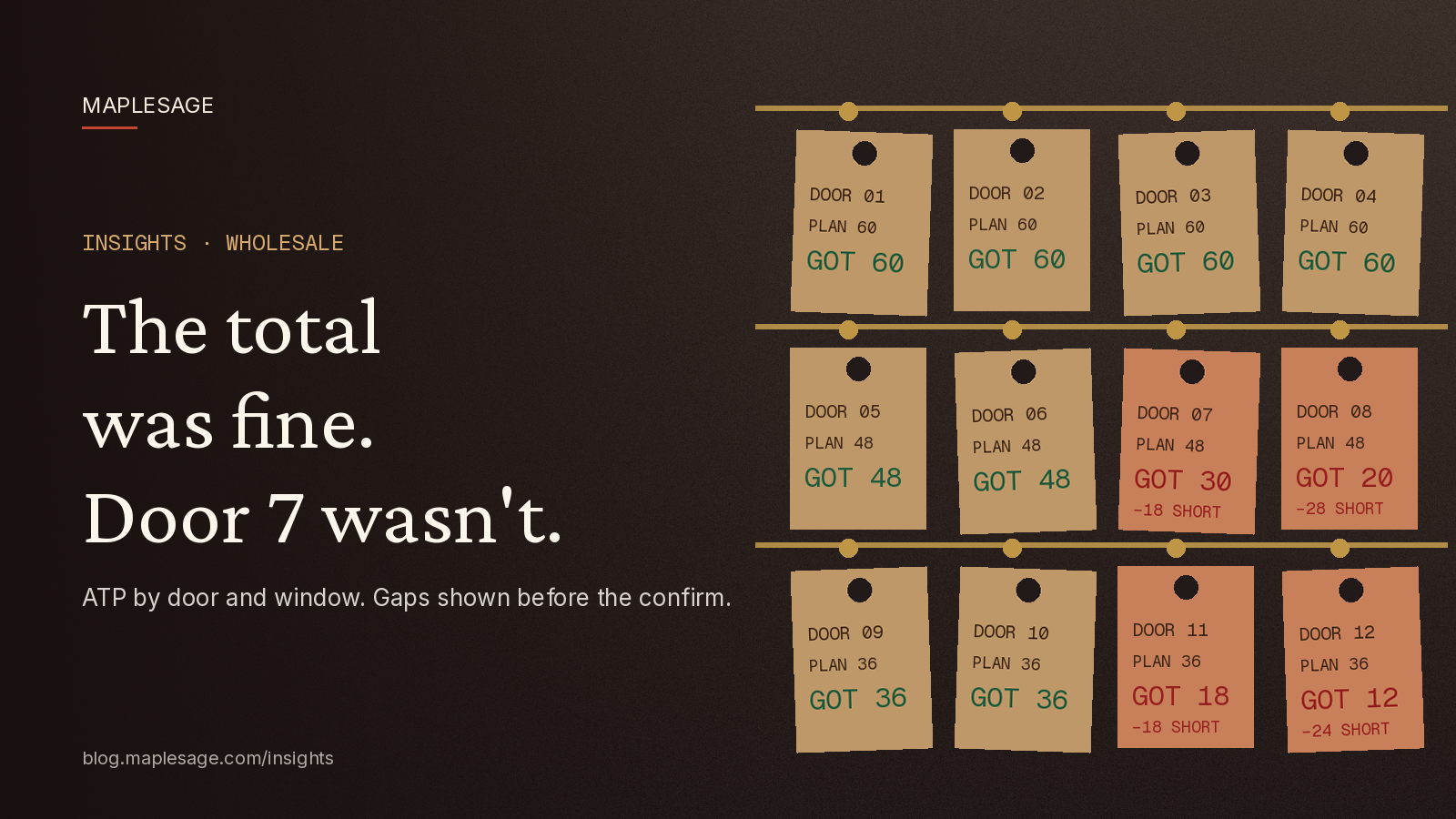
One account, twelve doors. The total can be fine while four doors are short.
A buyer places 1,200 units of a coat across 12 doors. Your sheet says 1,300 are available to promise for the account. Looks fine, so the line is confirmed.
Then the allocation runs. The flagship doors get their full curve. The outlet and resort doors get what is left, and four of them get well under what the buyer planned. The buyer planned those doors separately. The account number never knew.
Why the account number misleads
- It is a total. 1,300 free against 1,200 ordered says nothing about where the units can go.
- Doors are not interchangeable. A size run that works for an urban flagship does not work for a resort door, and the buyer’s plan reflects that.
- Windows differ by door. Resort doors often want an earlier window. Units landing late are not available to them.
- Allocation happens late. It is usually done by ops after the PO, so the shortfall appears when nobody can change the buy.
What the shortfall costs
Doors that open the season thin. Substitutions the buyer did not choose. A rep who has to explain a gap the sheet never showed. And a buyer who now pads the next order to protect against the same thing, which distorts your own next buy.
Door-level ATP, defined
For each style, colour and size, available to promise by door and by delivery window:
1. Planned. The units the buyer intends for that door.
2. Promisable. What can be committed to that door in that window, after holds on other accounts.
3. Gap. Planned minus promisable, visible on the line before the buyer confirms.
4. Next window. Where the gap can be filled, with its date.
Three rules for buying against door-level ATP
1. Show the gap on the sheet. The buyer sees “Door 7: 30 of 60 in the Feb window, 30 in March” while they are still choosing.
2. Allocate at quote time, not PO time. Reserve by door with an expiry, the same way a quote holds units.
3. Let the buyer re-balance. If a door is short, the buyer can move units, split the window, or drop the line. That is a decision, not a surprise.
What changes
First, fewer thin doors. The allocation the buyer sees is the allocation that ships.
Then, honest splits. Two windows stated up front beat one window quietly missed.
Then, better planning on your side. Door-level gaps show which styles are under-bought before production closes.
A one-week test
Take your three largest multi-door accounts from the last season. For each, compare the units each door planned with the units each door received.
- How many doors received less than planned?
- Was the gap visible on the sheet when the buyer confirmed?
- Who made the call on which door got shorted?
If the answer to the third question is “ops, after the PO”, the allocation is happening too late.
The short version
An account-level number tells you that you have units. A door-level number tells you whether the buyer’s plan survives. Show the gap before the confirm, not after the ship.
MapleSage Retail-OS keeps the wholesale spine in one place: sheet → selection → quote → PO → production. More Insights at blog.maplesage.com.